Claude and GPT model the same two parts
On 14 October 2026 we gave Claude Opus 5.5 (in Claude Code) and GPT-6 Astra (in OpenAI's Codex CLI) one plain-language brief: a bracket that clips onto a 35 mm DIN rail and holds an M12 sensor, and a snap-lid enclosure for a 50 x 70 mm PCB. Each wrote build123d scripts, ran them and exported STEP and STL. We checked the six files the way a print shop does and ran them through our own slicer. Both produced printable parts with the fits right. Neither could say whether the clip holds.
- Both: one valid closed solid per body, fits within the brief
- 8 minutes against 30 minutes to finished files
- Bracket 9.9 g or 15.8 g in PETG, from our slicer
- Snap force and rail grip: unproven until a test print
The verdict
Both models turned a 370-word brief into dimensionally correct, printable files in half an hour or less, and both wrote honest notes on what they did not know. GPT-6 Astra finished in 8 minutes with 18 shell commands. Claude Opus 5.5 took 30 minutes and 50 tool calls, and in that time made a bracket that prints on its side without support, cut the sensor hole as a teardrop so it needs none, and noticed that a straight M12 connector will not fit behind the rear nut.
The numbers that decide whether the enclosure works were right in both files: the four screw bosses at 43 x 63 mm centres, the USB-C opening 1.7 mm above the board, at least 2 mm under the board and at least 18 mm over the components. Neither file tells you whether the lid snaps shut or the clip stays on the rail. Those need one printed part in a hand.
One brief, one run each, on 14 October 2026. Models change every month; we will run the same brief again and update this page.
The brief
The same text went to both models, with no prior context and no web access. It names the material and nozzle, the tool and its version, where the installed source is, and what to hand back. Below is the text, with our local paths taken out, so you can reuse it.
"You are designing two parts for FDM 3D printing in PETG (0.4 mm nozzle). Avoid support material where you can. Write each part as a parametric Python script using build123d 0.13. It is installed; run scripts with <venv>/bin/python -I <script>. Its source is in <venv>/lib/python3*/site-packages/build123d if you need to check the API. Do not use the web. Each script must export <name>.step and <name>.stl, in millimetres, into your working folder. Run your scripts and check your own result: dimensions, and that each body is one valid closed solid. Stop when you would send the files to a print shop. Then write NOTES.md: for each part the key dimensions, the assumptions you made, how you checked it, what you are unsure of, and the print orientation you recommend. Also note how many times you ran each script and what you had to fix."
- Part 1: din_sensor_bracketA bracket that clips by hand onto a standard 35 mm top-hat DIN rail (EN 60715, TS35 x 7.5, 1 mm steel) and holds a cylindrical M12 inductive proximity sensor. The sensor passes through a 4 mm thick plate and is locked by two M12 nuts, one on each side. The sensor axis is horizontal and perpendicular to the rail face, pointing away from the cabinet back, 30 mm in front of the rail face, centred on the rail's 35 mm width. It must come off the rail again with a flat screwdriver.
- Part 2: pcb_enclosure (base and lid)A two-part enclosure for a 50 x 70 mm PCB, 1.6 mm thick. Four 3.2 mm mounting holes, centres 3.5 mm in from each corner. Components rise 18 mm above the board's top face; the underside has 2 mm of solder joints. A USB-C receptacle sits at the centre of one 50 mm edge: opening 9.0 x 3.3 mm, its centre 1.7 mm above the board's top face, flush with the board edge. The board is fixed with M3 x 6 self-tapping screws for plastic into bosses in the base. The lid snaps on, no screws. Walls 2 mm.
Two things in it did most of the work: the version number with the path to the installed source, and the order to run the script and check the result before stopping. Astra replaced a call that does not exist in build123d 0.13 with the underlying Open Cascade function; Opus read the source first and still met two behaviours it did not expect. Opus's own checks caught its geometry bugs; Astra redesigned its lid after reviewing its own first version.
The results, measured
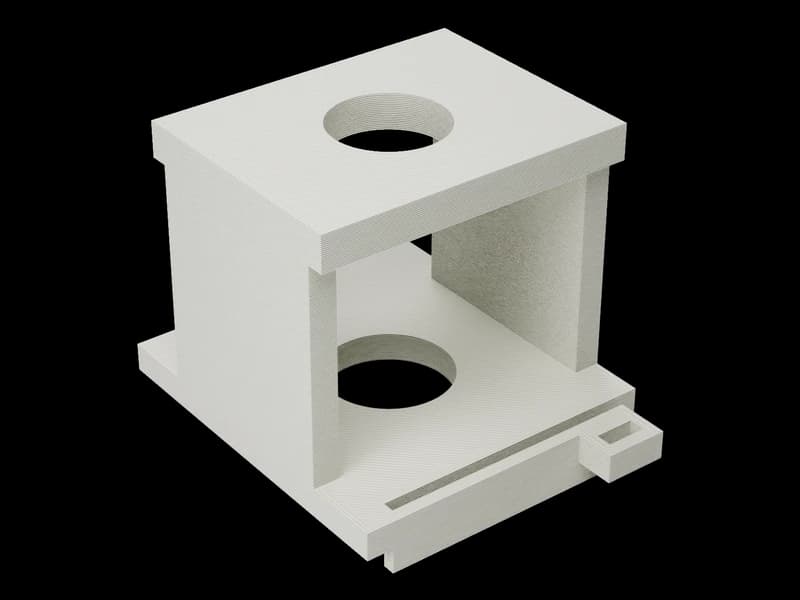
Validity, sizes and hole positions were read from the STEP files with our own script, not from the models' notes. Fits inside the enclosure were probed point by point inside the solids. Grams and print time come from our own slicer: 0.20 mm layers, 2 walls, 20% gyroid infill, PETG, one piece, automatic supports and a 5 mm brim.
| GPT-6 Astra | Claude Opus 5.5 | |
|---|---|---|
| Time to finished files | GPT-6 Astra8 min | Claude Opus 5.530 min |
| Work | GPT-6 Astra18 shell commands; bracket script run 2x, enclosure 4x | Claude Opus 5.550 tool calls; bracket script run 5x, enclosure 4x |
| First run | GPT-6 AstraStopped on a build123d call that does not exist in 0.13 (Shell.is_closed); fixed by itself | Claude Opus 5.5Ran, but its own checks found real geometry bugs (below) |
| One valid closed solid per body | GPT-6 AstraYes, all three | Claude Opus 5.5Yes, all three |
| Screw bosses (brief: 43 x 63 mm centres) | GPT-6 Astra4, at ±21.5 / ±31.5 mm, 2.5 mm pilots | Claude Opus 5.54, at ±31.5 / ±21.5 mm, 2.5 mm pilots |
| Gap under the board (need 2 mm or more) | GPT-6 Astra5.0 mm | Claude Opus 5.54.0 mm |
| Headroom over components (need 18 mm or more) | GPT-6 Astra20.0 mm | Claude Opus 5.519.0 mm |
| USB opening centre above the board (brief 1.7 mm) | GPT-6 Astra1.7 mm | Claude Opus 5.51.7 mm |
| USB opening width at the wall mid-plane | GPT-6 Astra12.3 mm, flared mouth | Claude Opus 5.512.7 mm, plus an outside pocket for the plug body |
| Sensor bore | GPT-6 Astra12.6 mm round, centred | Claude Opus 5.512.6 mm teardrop, centred |
| Bracket print orientation | GPT-6 AstraPlate face down, local supports (chose spring strength over no supports, and said so) | Claude Opus 5.5On its side, no supports; the latch bends in the layer plane |
| Lid catches | GPT-6 Astra2 tabs, 8 mm wide, 0.5 mm engagement, release windows | Claude Opus 5.54 hooks into windows in the long walls |
| Bracket in our slicer, PETG | GPT-6 Astra15.8 g, 49 min | Claude Opus 5.59.9 g, 33 min |
| Base | GPT-6 Astra28.0 g, 50 min | Claude Opus 5.526.4 g, 49 min |
| Lid | GPT-6 Astra15.7 g, 39 min | Claude Opus 5.512.4 g, 38 min |
| Slicer accepted every file | GPT-6 AstraYes | Claude Opus 5.5Yes |
Same material, same settings, same slicer, so the grams compare what each file takes to print. The bracket differs most, 15.8 g against 9.9 g, yet the two bracket solids are almost the same volume: 11,506 and 11,375 mm³ in our check. The 6 g is how each one prints, not a lighter design: Opus's bracket lies on its side and needs no support, Astra's needs local supports.
What each model caught by itself
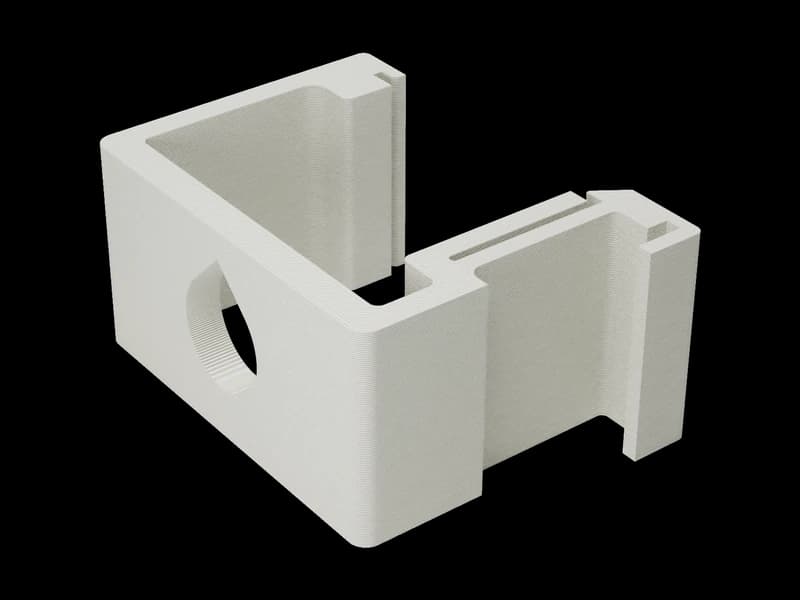
- Both: the 30 mm that means nothingThe brief puts the sensor axis perpendicular to the rail face and then gives a distance from that face to the axis. A line normal to a plane has no distance from it. Both models said so in their notes and both read it as the plate's mid-plane sitting 30 mm in front of the rail. That is the right reading, and the brief should have said it.
- Astra: a lid that would have needed supportIts first lid used horizontal flexures, which print as overhangs. It redesigned them as vertical tabs, then widened the box 0.7 mm per side so the components clear the tabs while they flex, and wrote an assertion for that clearance. It also stated what it assumed: nuts at most 22 mm across, no measured retention force.
- Opus: a teardrop that was never cutIn algebra mode, Circle + Polygon gave two faces, and only the circle cut the plate. Runs 1 to 3 exported a plain round hole that would have drooped at the top. An orientation check it added in run 4 found it; run 5 rebuilt the hole in builder mode and asserts one face. The volume dropped by 34 mm³, the point's area times the 4 mm plate.
- Opus: a USB opening in the wrong frameThe height offset was applied after mapping the sketch onto the wall plane, so it moved sideways instead of up. A receptacle overlap check (93 mm³) and a probe assert caught it on run 1.
- Opus: no room for a straight connectorAbout 30 mm stays free between the rear nut and the rail channel. A straight M12 cable plug needs more. The notes say: use an angled connector or a cable sensor led out sideways. Nothing in the brief asked for this; it follows from the geometry.
What neither could prove
Snap force on the lid, how hard the clip grips a real rail, PETG creep under the two nuts, and whether every USB-C plug latches at the depth each chose: Astra's receptacle sits 2.6 mm behind the outer face, Opus pockets the wall so the plug body stops 0.9 mm from the receptacle. Both said so plainly. Opus gave a hand calculation for the latch, about 30 N at the finger, and called it a calculation, not a test.
These are exactly the things a print shop settles with one part: print the bracket, push it onto a rail, take it off with a screwdriver, and change one parameter if it is too stiff. Both scripts put those parameters at the top for that reason.
What this means if you want the part made
An AI-written CAD file from a clear brief is now good enough to send to a shop. It is not good enough to skip the test print, and it is not good enough to skip the person who opens the file. Every catch above was in geometry that was valid, closed and the right size; it took knowing what the part is for to find it.
So: brief the model the way the text above does, with the version pinned and the order to check its own output. Open the STL yourself and read the bounding box. Then send us the STEP or STL in millimetres. A person reads it, prices one piece, and you try that piece on the rail before anyone prints ten.
How we ran it
- ModelsClaude Opus 5.5 as a fresh Claude Code agent with no prior context; GPT-6 Astra through the OpenAI Codex CLI 0.156.1 with a workspace-write sandbox. Both started at 23:11 on 14 October 2026, both without web access.
- Toolbuild123d 0.13 in a Python virtual environment. Each model could run its scripts and read the installed source.
- Our checksA script that imports each STEP file and reports solids, validity, bounding box, volume and every cylindrical face with its radius, axis and centre. A second script samples points inside the enclosure solids to measure the board height on the bosses, the gap under it, the headroom under the lid and the USB opening's position and width.
- Our slicerThe slicer behind our automatic estimates: 0.20 mm layers, 2 walls, 20% gyroid infill, 12 mm³/s maximum flow, PETG, one piece, automatic orientation where it was faster than the uploaded one, automatic supports, a 5 mm brim.
- LimitsOne brief, one run per model, one person reading the output. Not a benchmark with error bars; a test a shop can repeat. The six files and both models' notes are kept with the test.
Questions
Checked by the druckworks workshopUpdated
Which model is better at CAD, Claude or GPT?
In this test neither lost. Astra was four times faster; Opus made the bracket that needs no support and caught the connector problem. Both got every fit in the brief right. One run each, so treat it as a sample, not a ranking.
Can I use the brief for my own part?
Yes. Keep the structure: material and nozzle, tool and version with the path to its source, STEP and STL in mm, run and check your own result, notes with assumptions and run count. Replace the two parts with yours.
Why build123d and not OpenSCAD?
We wanted STEP files to measure exactly, and OpenSCAD exports meshes only. The code CAD guide linked above compares the three options.
Did you print the parts?
Not for this page. The files were checked in the B-rep and sliced; grams and minutes are the slicer's. A test print is the step we recommend to anyone who wants the part made.
Do you price an AI-made file differently?
No. A person opens it and checks it like any other file. If it is not closed or the size is off, we say so before any price.
Will you run the test again?
Yes, with the same brief, when the models change. The date at the top is the date of the run you are reading.

Send the STEP or STL
In millimetres, from the form or by email. A person checks it and replies with a price for one piece in 3 hours on average on workdays.