Let your agent order the print
We run an MCP server at mcp.druckworks.eu/mcp. An AI agent connects to it, uploads an STL, reads an automatic estimate, sends the enquiry and follows the order. A person here reviews every request before a payable quote exists, and you approve and pay. Today the upload and order tools need a druckworks sign-in that is not open to the public yet; the quote brief at /ai takes the same request without one.
- Eight tools, from upload to delivery status
- A person reviews every request before a quote
- STL in mm for estimates: PLA Basic and PETG HF
- Ships to the Baltics, Finland, Sweden and Denmark
What agentic 3D printing means here
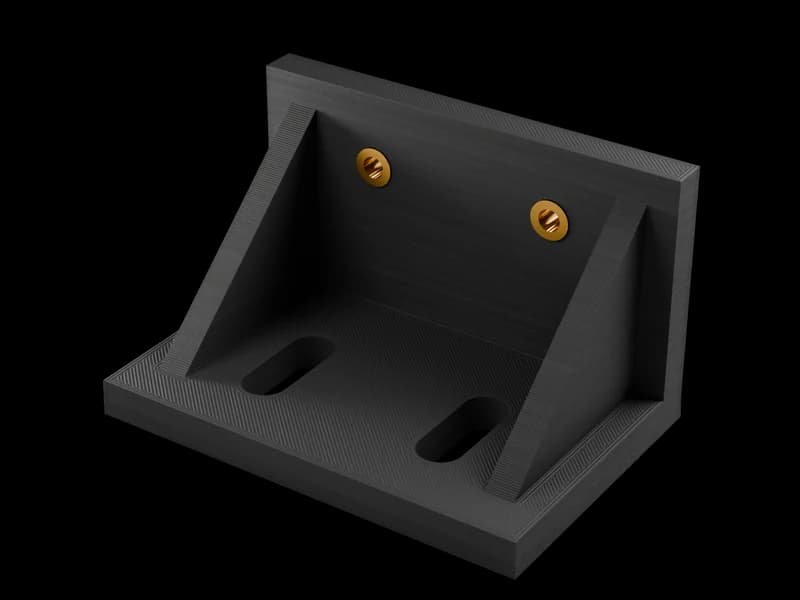
Many MCP servers for 3D printing drive a printer you own: they read its status, pause a job, upload G-code to it. Ours makes the part for you. The agent does the clerical work of ordering: it checks what we accept, uploads the model, requests an estimate, writes the enquiry and reads back the quote and the order status. The judgement stays with people: a person at druckworks reviews the request, and you accept the quote and pay on our website.
The server is MCP over Streamable HTTP at https://mcp.druckworks.eu/mcp. On 14 October 2026 it answered tools/list and get_print_capabilities without an account; the other seven tools, from upload to order status, asked for a druckworks sign-in, which is not open to the public yet. Until it is, an agent sends the request through the quote brief at druckworks.eu/ai and the enquiry endpoint it documents, with no account and no key. Everything below comes from those answers.
The eight tools, in order
They follow the workflow the server itself publishes: upload, estimate, submit, human review, approved quote, accept and pay, production, delivery.
- get_print_capabilitiesReads the accepted format, the materials, the estimate limits, the delivery options and the workflow. Sends nothing and starts nothing.
- create_model_upload_linkReserves a private, short-lived upload page for one STL. The server tells the agent to get your approval before any file moves.
- estimate_printTakes the uploaded STL plus millimetres, material, colour and quantity and calculates a preliminary manufacturing price in EUR, shipping excluded. It is an estimate, not a quote, and it cannot be paid.
- get_print_estimateReads the estimate while it is still calculating, and the result when it is done, with any reason it needs a human to look at it.
- submit_print_requestSends the enquiry: the estimate or the files, requirements, your contact details and the delivery destination. The agent must have your approval first. It does not accept an order, charge a card or start a printer.
- get_print_quoteReads the review state, then the quote a person here has approved: specification, delivery terms, expiry and the exact total.
- create_checkoutPrepares the review link for the current approved quote. You confirm the specification, the locker or address and the total on our website before any payment page opens. The tool cannot set a price or accept the quote.
- get_print_order_statusReads verified payment, production and shipping facts, with tracking once there is some. Opening checkout is not payment; shipped is not delivered.
What the automatic estimate covers
The limits as the server states them. Everything outside them goes to the quote form, where a person prices it.
- STL only, in millimetres3MF, OBJ and STEP are not estimated automatically. Send them through the quote form for manual review.
- PLA Basic and PETG HFThe two materials with an automatic estimate. TPU for AMS, PPA-CF, PPS-CF, PET-CF, PC FR, ASA Aero and the ordered-in filaments are listed by the server, and each is priced by a person.
- Up to 20 pieces, 25 MB, 500,000 trianglesOne file per upload. A bigger run can still go in as an enquiry over MCP, up to 1,000 pieces, for a person to price; a heavier mesh goes through the quote form or by email.
- Preliminary, reviewed, not payableThe server marks every estimate as preliminary and review-required. The workshop confirms production, colour availability and the payable quote.
- Standard settings0.20 mm layers and 2 walls. Stronger or custom settings go to a person.
- Shipping quoted separatelyParcels leave from Latvia and Estonia to a parcel locker or an address, and the price is quoted for the destination. The server never assumes free shipping.
If the agent includes your destination country, the estimate shares the model geometry and print specification with a price-comparison service and its suppliers to compare printing prices, under a generic filename and without your contact details. The result comes back as a comparison summary with the number of offers checked and the time, and an eligible lower offer can bring our printing price down. Leave the country out and no comparison runs.
Who does what
| Step | Your agent | A person at druckworks | You |
|---|---|---|---|
| Read the rules | Your agentget_print_capabilities | A person at druckworksWrote them | YouNothing |
| Upload the model | Your agentReserves the link, asks you first | A person at druckworksNothing yet | YouApprove the file leaving your machine |
| Estimate | Your agentConfirms mm, material, colour, quantity; calls estimate_print | A person at druckworksNothing yet | YouConfirm the four inputs |
| Enquiry | Your agentsubmit_print_request, with your approval | A person at druckworksReads it | YouApprove sending your contact details |
| Quote | Your agentget_print_quote | A person at druckworksReviews the part, sets the price and the date | YouRead it |
| Pay | Your agentcreate_checkout, on your request | A person at druckworksNothing | YouConfirm specification and total on our site, pay |
| Make and ship | Your agentget_print_order_status | A person at druckworksPrints, posts, enters tracking | YouReceive the parcel |
Nothing in the druckworks column happens by itself. The estimate is arithmetic; the quote is a person who has opened your file.
Approval and your data
The server's own instructions to the agent include this one: ask before sending files or contact details or submitting an enquiry. A well-behaved agent will show you the file name, the material, the quantity and the destination and wait for a yes. If yours does not, say so in your prompt.
What leaves your machine: the STL, the print specification and, at enquiry, your contact details and delivery destination. With a destination country on the estimate, the geometry and specification also go to a price-comparison service and its suppliers. We take no parts by post and we scan nothing.
Without MCP: the brief and the mailbox
An agent that cannot connect to an MCP server, or has no druckworks sign-in yet, can still do most of the work. Point it at our quote brief at druckworks.eu/ai (there is a Markdown twin at /ai.md). It lists what we need to know before pricing a part: use, peak temperature, load, chemicals, finish, the dimensions that must fit and the date. The agent fills the brief, shows it to you, and either you paste it into the quote form or the agent posts it to the enquiry endpoint described on that page.
The third door is email. An agent can draft the message with the brief and the file attached; a person reads it and replies with a price, in 3 hours on average on workdays.
What to type to your agent
A real request, as a user would write it: "Connect to the druckworks MCP server at https://mcp.druckworks.eu/mcp. Read the print capabilities. Then upload bracket_v3.stl, in millimetres, and get an estimate for 4 pieces in PETG HF, white, delivered to Finland. Show me the estimate and the comparison before you do anything else. Ask me before you send any file or my contact details."
Today the agent gets as far as the capabilities: the upload and estimate tools ask for a sign-in that is not open to the public yet, so the agent sends the same request through the quote brief at druckworks.eu/ai. Either way, a person at druckworks reads the file next.
Where this is the wrong tool
- Driving your own printerThis server makes parts in our workshop. To let an agent start, pause or watch your own printer, you need a printer-control MCP server; ours does none of that.
- A STEP-first workflowThe automatic estimate reads STL only. A STEP file is welcome, but it goes through the quote form and a person.
- Carbon-fibre, flame-retardant or flexible partsListed by the server, priced by a person. The agent can send the enquiry; it will not get a number back by itself.
- Delivery outside the Baltics, Finland, Sweden and DenmarkWe post only to these six countries, so we cannot deliver an order anywhere else.
- Anything not FDMNo resin, no metal, no machining, no scanning. A part that needs a ±0.1 mm fit or a moulded surface needs another process, and we say so.
Questions
Checked by the druckworks workshopUpdated
Which agents can connect?
Any MCP client that supports Streamable HTTP and OAuth sign-in can try. We list no verified integrations; the home page has a setup prompt to paste into yours.
Do I need an account?
To read the capabilities, no. The other seven tools, from upload to order status, need a druckworks sign-in that is not open to the public yet. Until it is, your agent sends the request through the quote brief at /ai and its enquiry endpoint, with no account, or you use the quote form.
Can the agent pay for me?
No. create_checkout prepares a review link; you confirm the specification and the total on our website and pay there yourself.
Is the estimate the price?
No. It is a preliminary manufacturing estimate without shipping. A person reviews the file and issues the quote, which holds for one week.
Why does the estimate include a price comparison?
When the agent gives a destination country, the geometry and specification are shared with a price-comparison service and its suppliers to compare printing prices. Omit the country and no comparison runs.
Can the agent send a STEP file?
Not for an automatic estimate. Export STL for the estimate, or send the STEP through the quote form for a person to price.

Or send the file yourself
The quote form takes STEP, STL, 3MF or OBJ. A person replies with a price in 3 hours on average on workdays.