A photo gives the shape, not the size
Image-to-3D tools turn a picture of your broken clip into a mesh that looks like it. They cannot know it was 47.5 mm long, because no photo carries that. A replacement part has to fit, so its numbers come from a ruler or calipers. This page says when the AI shape is enough, when it is not, and what to do instead.
- Modelling is its own line on the quote
- Tolerance ±0.5% of the size, minimum ±0.5 mm
- Reply in 3 hours on average on workdays
- Ships to the Baltics, Finland, Sweden and Denmark
What an image-to-3D tool gives you
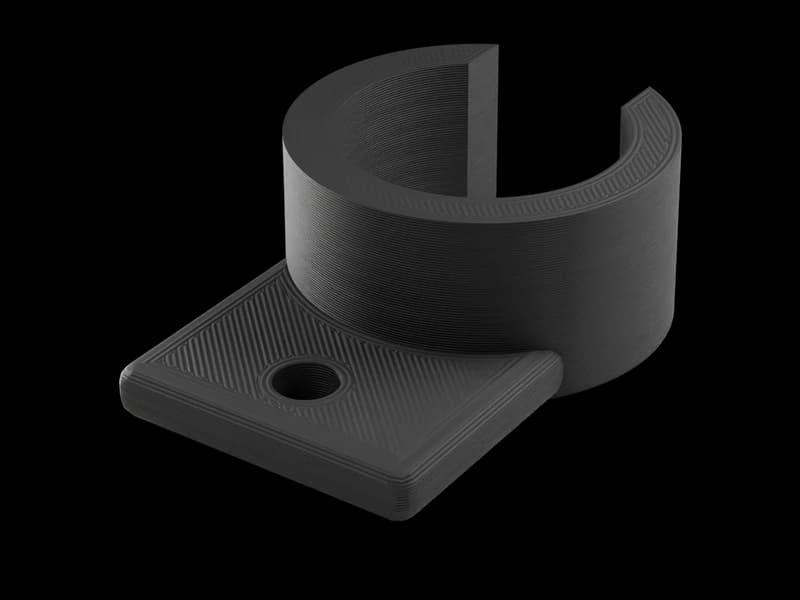
A single photo, or a few from different angles, goes in. A triangle mesh comes out: STL, OBJ or 3MF, in about a minute in Meshy's case. The mesh reproduces what the camera saw: silhouette, proportions, the rough form of the hidden side. Its size is a guess. Meshy, for one, lets you type a height before export, but that scales the whole shape from one number; every other size still follows the photo's proportions. STL and OBJ store no unit at all, so the slicer assumes millimetres and shows whatever number the generator wrote.
When such a file reaches our enquiry endpoint as the first STL of an enquiry, it is measured on arrival: volume, bounding box, and whether the mesh is closed. For a generated mesh, closed: false is the usual report. A person then looks at it. None of that tells us whether the part is the right size, because only the broken part knows that.
Photogrammetry and 3D scanning are different: they measure the object from many photos or a sensor, and with a scale reference in the shot they recover its real size. We do neither; a service that does can make the file, and we print from it.
When the AI shape is enough
- Decor and figurinesA model of your dog, an ornament, a panel with a pattern. Nothing fits into it. Scale it to the height you like and print.
- A knob, a cap, a cover with one size that mattersGenerate the shape, measure the one dimension that mates, in the slicer, keep uniform scaling on and type the measured value into that axis's size field. The rest follows the photo's proportions, which is usually close enough for a cap.
- A starting shape to redrawA sculpted handle or a shell with curves you cannot measure. The mesh gives the form; you or we add the measured features on top.
When it is the wrong tool
Anything that has to fit something else.
- Clips, hooks and snap fitsThe thickness of the hook and the gap it springs into decide whether it holds or breaks. A photo guesses both.
- Brackets and mountsHole diameters and the distance between holes come from the thing it bolts to. A mesh cannot carry a 6.4 mm hole at 40 mm centres; it carries a hole-shaped dent.
- Adaptors, bushings, anything on a shaft or in a boreDiameters within a fraction of a millimetre. Our tolerance is ±0.5% of the size, minimum ±0.5 mm, and a mesh with a guessed diameter wastes it.
- Gears and threadsTooth count, module and pitch are numbers, not shapes. Draw them.
Scaling a generated mesh fixes one dimension. If the photo made the part a little too wide for its length, scaling to the right length makes it too wide, and no slider fixes both. That is why a part that mates is drawn from numbers, not scaled from a picture.
Three routes that give a part that fits
- Photos with a ruler, plus the measurements, and we draw itSend 1-3 photos with a ruler flat against the part and the sizes that matter in mm. A person decides whether it can be drawn, draws it, and you approve the model before anything prints. Modelling is a separate line on the quote, priced for the part. How to photograph and what to send is in the spare-part guide linked below.
- Code CAD from your measurementsGive the measurements to a language model and ask for an OpenSCAD, CadQuery or build123d script with each mating size as a parameter, in millimetres, one closed solid, STEP and STL exported. You run it, check the hole against the bolt, and send us the file. Our AI modelling guide covers what to ask for.
- AI shape as the base, measured features on topGenerate the mesh for the look, then fix the bounding box to one measured length and add the hole, slot or bore in a CAD tool from calipers. The most work; worth it for a curved housing with one flat mating face.
What to measure, whichever route
Calipers if you have them, a steel rule if not. Write mm next to every number.
- Overall length, width and heightOf the whole part, broken pieces held together.
- Every hole: diameter and centre distanceMeasure the bolt or pin that goes through it as well. That is the number that matters.
- Wall thicknessWhere you can reach it. It sets strength and whether the part can be printed at all.
- The mating partThe shaft, the rail, the slot it sits in. A photo of the part in place, if the machine still exists.
- Where it brokeThat is where the load runs, and where we add material or turn the layers.
Where we are the wrong answer
- A free-form surface you cannot measureA sculpted grip, an organic housing with no flat reference. A photo and a ruler do not capture it, and we do not scan. A 3D scanning service can make the file; we can print from it.
Tight fits, moulded finishes and safety-critical parts are covered in the spare-part guide below. A person says which applies before you pay anything.
Read next
- Check an STL in your browser: size, volume, closed or not
- Check an AI-made model before printing
- The test: Claude and GPT model the same two parts
- A broken part and no CAD file: what to photograph and send
- AI modelling for a 3D printed part: mesh or code CAD
- Let your agent order the print: our MCP server
- What our ±0.5% tolerance means by size
Questions
Checked by the druckworks workshopUpdated
Can you print an STL I made from a photo?
Yes, if it is closed or can be repaired, and if nothing on it has to fit. A person checks the mesh and tells you which.
Can you scale it to the right size for me?
To one dimension, yes, if you give it. Scaling cannot correct the proportions a photo got wrong; a part that mates is drawn from measurements.
How many photos do you need to model a part?
One to three, with a ruler in the shot, plus the sizes that matter in mm. The spare-part guide shows the angles.
Can you model from the AI mesh instead of photos?
Yes, as a starting shape. Send the mesh with the sizes that matter in mm; a person draws the mating features from your numbers, and modelling is its own line on the quote.
Can you scan the part instead?
No. We do not scan, and we take no parts by post. A scanning service can produce a file, and we print from it.
Which image-to-3D tool should I use?
For the look, any tool that exports STL or 3MF. For a part that has to fit, none on its own: the sizes come from your calipers, whether we draw the part or a language model writes the CAD code.
Send the mesh, photos and sizes
An AI mesh, photos with a ruler, or both, with the sizes that matter in mm. A person replies in 3 hours on average on workdays.